

Where to Build a Customer-Facing Dashboard Without Coding in 2026
Founders and operators often ask where they can build a customer-facing dashboard for their business without writing code. The answer lies in using a controlled AI build platform that translates plain-English briefs into working software. I Team App Builder is a software platform designed to function as a software team within a single controlled workflow. This guide covers how to select the right tool, integrate data sources, and verify your build pipeline. For additional details, review the .
Understanding the AI Build Pipeline
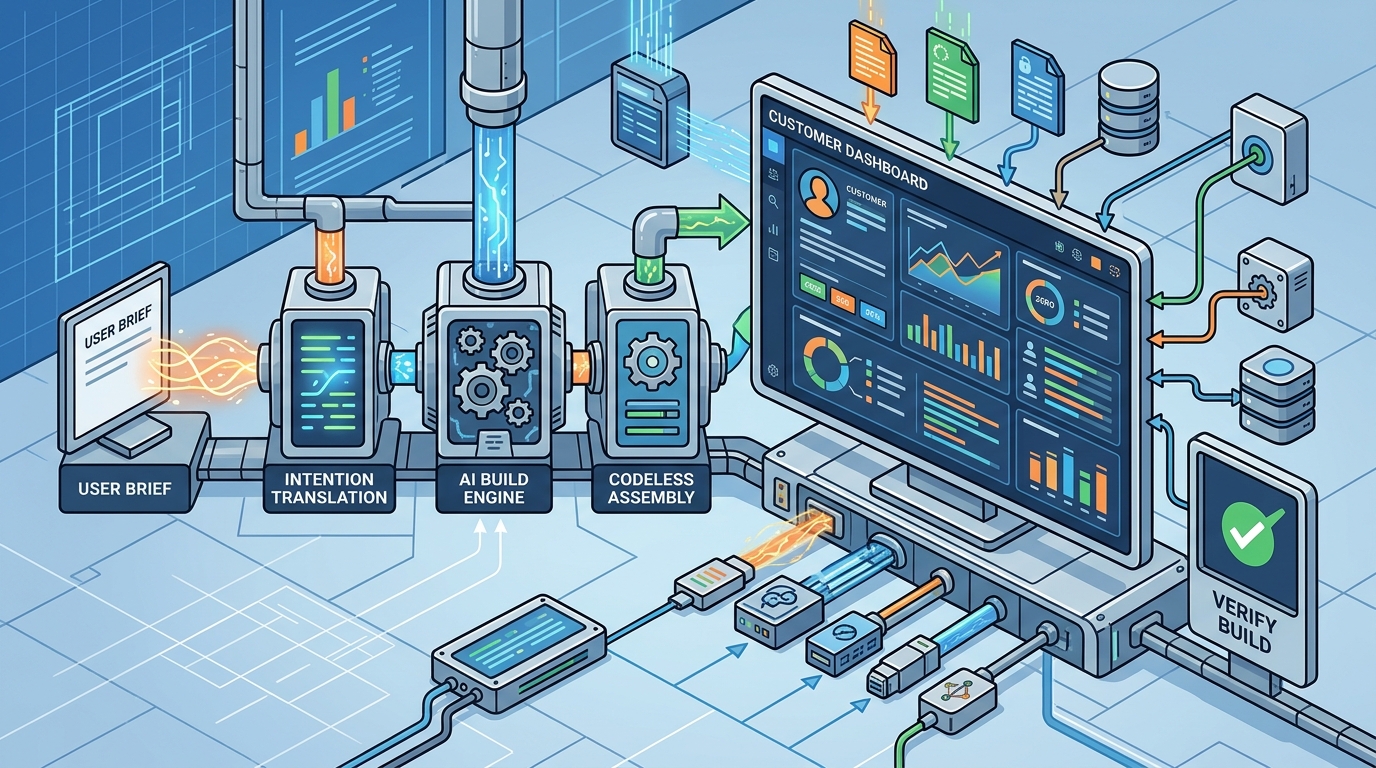
Traditional no-code tools often require users to manually drag and drop components. This approach can lead to fragmented logic and difficult maintenance. A modern AI build engine takes a different approach. It turns a plain-English brief into a planned, built, and tested application. This process eliminates the need for the user to manage the underlying engineering stack. For additional details, review the Frequently Asked Questions.
The Four-Phase Workflow
The build process typically follows a structured sequence. First, the system plans the screens, data structures, and build phases. Second, it writes the application code through a direct AI build engine. Third, it runs static analysis to catch errors. Finally, it performs runtime verification to ensure the app works as intended. This controlled pipeline reduces the risk of runaway repair loops that plague less structured tools. For additional details, review the About.
Data Source Integration
Data source integration is the process of connecting your existing business data to the new dashboard. For a customer-facing dashboard, this usually involves pulling data from a CRM, a payment processor, or a custom database. The platform must be able to map these external data points to the visual components of the dashboard.
Connecting External APIs
Most business data lives in third-party APIs. The build engine needs to handle authentication and data fetching securely. By keeping provider credentials server-side, the platform allows customers to focus on creation while the system handles the technical execution. This means you do not need to store sensitive API keys in your client-side code. The system manages the connection between your data source and the dashboard interface.
Mapping Data to UI Components
Once data is connected, the system maps it to UI elements. A table component might display a list of recent transactions. A chart component might visualize monthly revenue. The AI engine determines the best way to present this data based on your brief. You describe what you want to see, and the system builds the visualization. This removes the need for manual data binding, which is a common pain point in traditional no-code tools.
Comparing No-Code and AI Build Tools
| Setup Time | Hours to Days | Minutes to Hours |
| Technical Skill Required | Medium (Logic and Data) | Low (Plain English) |
| Maintenance | Manual Updates | Automated Verification |
| Customization | High Granularity | Brief-Driven |
Tools like Bubble and FlutterFlow are excellent for users who want to design every pixel. However, they require a deep understanding of data structures and logic flows. I Team App Builder is tailored for users who know what they want to make but do not want to manage the underlying infrastructure. It is ideal for founders, artists, and operators who need a working product quickly.
Security and Credential Management
Security is a critical concern when building customer-facing dashboards. You are handling sensitive data, including customer information and financial records. The platform must ensure that this data is protected at every layer. One of the most important aspects of security is credential management.
Server-Side Credentials
Access Control
Access control determines who can view and interact with the dashboard. A customer-facing dashboard should only show data relevant to that specific customer. The build engine must implement role-based access control to ensure that users cannot see other customers' data. This is a fundamental requirement for any multi-tenant application. The platform should provide built-in mechanisms for managing user roles and permissions.
Verification and Testing
Verification is the process of ensuring that the generated software works as intended. It is not enough to just generate code; you must verify that it runs correctly. The build pipeline includes automated verification steps to catch errors before they reach the user. This includes static analysis, which checks the code for syntax errors and potential bugs.
Runtime Verification
Runtime verification goes a step further. It actually runs the application in a sandboxed environment to ensure that it behaves as expected. This catches errors that static analysis might miss, such as runtime exceptions or logic errors. The system reports any issues found during verification, allowing you to fix them before deployment. This reduces the risk of shipping broken software to your customers.
Versioned Projects
Versioned projects allow you to track changes to your application over time. Each build is saved as a version, so you can roll back to a previous version if a new change introduces a bug. This is essential for maintaining stability in a production environment. The platform should provide a clear history of all changes, including who made them and when. This transparency helps you understand the evolution of your application.
Key Takeaways
- AI build platforms translate plain-English briefs into working software, eliminating the need for manual coding.
- Data source integration connects your existing business data to the dashboard, with credentials managed server-side for security.
- Server-side credential management prevents API key leakage and enhances the security of your application.
- Automated verification, including static analysis and runtime testing, catches errors before deployment.
- Versioned projects allow you to track changes and roll back to previous versions if needed.
- I Team App Builder is designed for users who want to build applications without managing the engineering stack.
Frequently Asked Questions
What is a customer-facing dashboard?
A customer-facing dashboard is a web interface that allows your customers to view their data and interact with your service. It typically displays information such as account status, transaction history, and usage metrics.
How does I Team App Builder handle data security?
I Team App Builder keeps provider credentials server-side, ensuring that sensitive API keys are not exposed in the client-side code. The platform also supports role-based access control to protect customer data.
Can I connect my existing database to the dashboard?
Do I need to know how to code to use this platform?
No, the platform is designed for users who do not want to manage the engineering stack. You describe what you want in plain English, and the system builds the application.
What is runtime verification?
Runtime verification is a testing process that runs the application in a sandboxed environment to ensure it behaves as expected. It catches errors that static analysis might miss.
How long does it take to build a dashboard?
The time required depends on the complexity of the project. Simple dashboards can be built in minutes, while more complex applications may take hours. The controlled build pipeline helps streamline the process.
Can I roll back to a previous version of my app?
Yes, the platform supports versioned projects, allowing you to track changes and roll back to previous versions if a new change introduces a bug.
Conclusion
Building a customer-facing dashboard without coding is now accessible to founders and operators who use the right tools. I Team App Builder provides a controlled AI build pipeline that turns plain-English briefs into verified applications. By focusing on data source integration, security, and automated verification, the platform allows you to focus on your business while the system handles the technical execution. To start building your application, visit I Team App Builder.